
At PartsTrader, we’re committed to your success. Our modern UI isn’t just about aesthetics – it’s about unlocking efficiency and empowering your shop to operate more effectively.
We’ve listened to your feedback and incorporated them in the redesign. We encourage your continued feedback, as it directly influences what we build. Ultimately, we aim to improve your day-to-day, by making parts ordering simple, transparent, and manageable.
Jobs Page

INTRODUCING THE FUTURE OF PARTS ORDERING
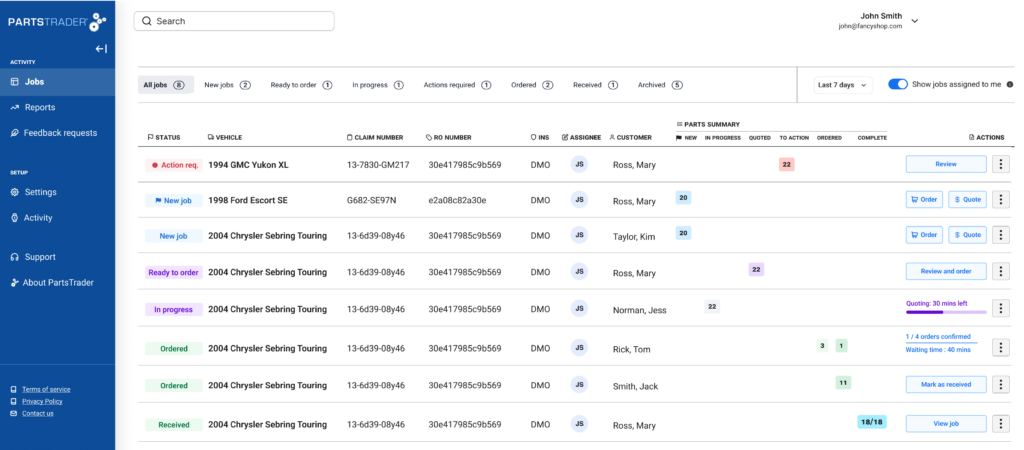
Welcome to the new Jobs Page from PartsTrader. It’s the start of a new modernized look and feel, designed with one goal in mind; to elevate your productivity.
The new designs provide the user clear visibility over all orders, their status, and any actions required, so orders are delivered on time to ensure a seamless repair process.
Click to enlarge image
SEAMLESS JOB MANAGEMENT
Click to enlarge image
Click to enlarge image
Click to enlarge image
Click to enlarge image
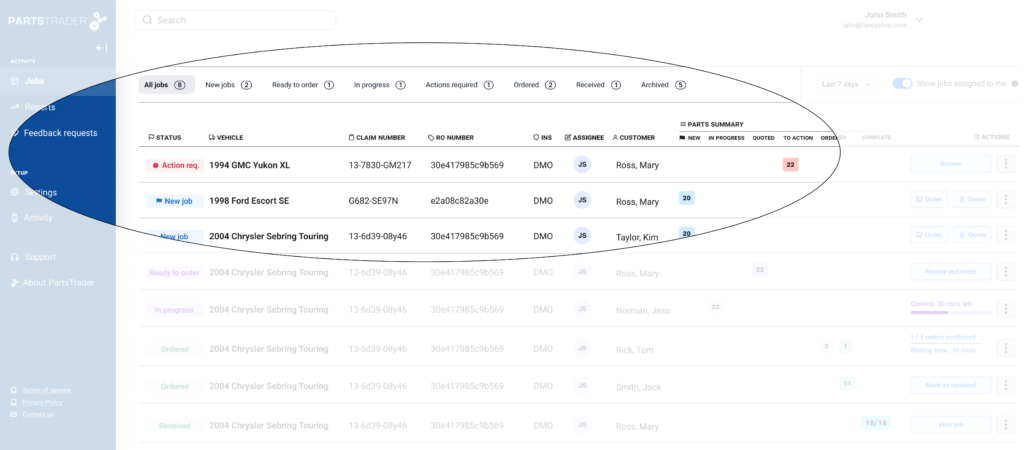
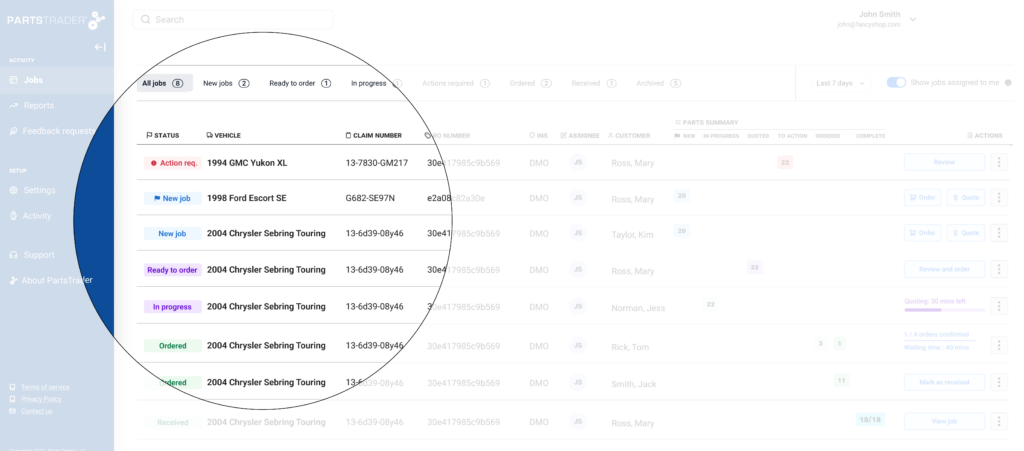
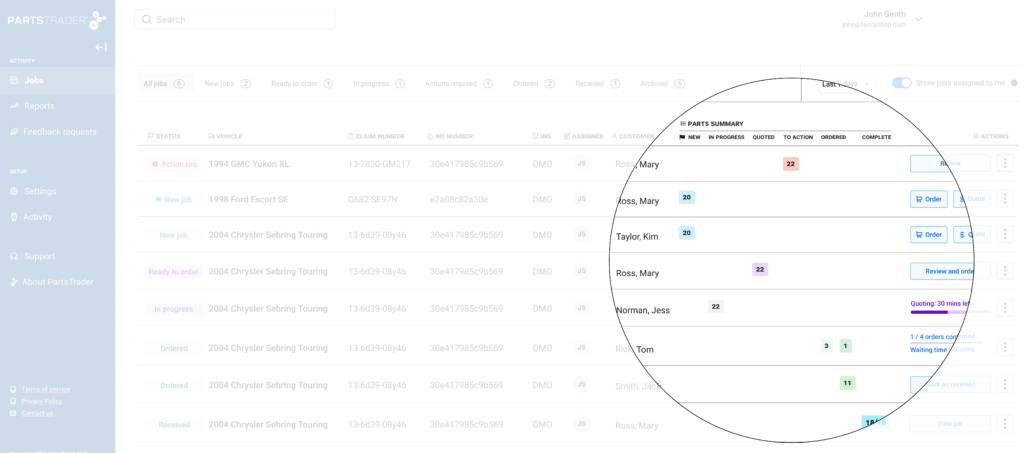
Key Statuses
Action Required: This status indicates one of three scenarios:
1. The vendor can no longer supply.
2. The vendor has changes to the order that require your attention (based on your company settings).
3. The quoting period has ended, and there are no quotes from vendors.*
In Progress: This means the parts on the job are out for quote. On the page you will see, how much time is remaining on the quoting window
Ready to Order: Your quote period has ended, and there are quotes from vendors *
The job status indicates the most important action needed on the job. It provides an overview of the overall progress and key actions required for the job as a whole.
Part Summary
A job can have parts in multiple states, the part summary table shows how many parts are in each state. Clicking on the icon in the part summary table will take you to the most relevant screen to progress those parts.
For a more detailed breakdown of the part summary, visit the Help Center.
Archiving
We understand that some jobs may appear on your dashboard that are not relevant to you and will not be worked on. If you know a job will not progress to an order, you can use the ‘archive’ button to hide it from view. If you or any of your team need to work on that job later, you can still easily find it via the search function.
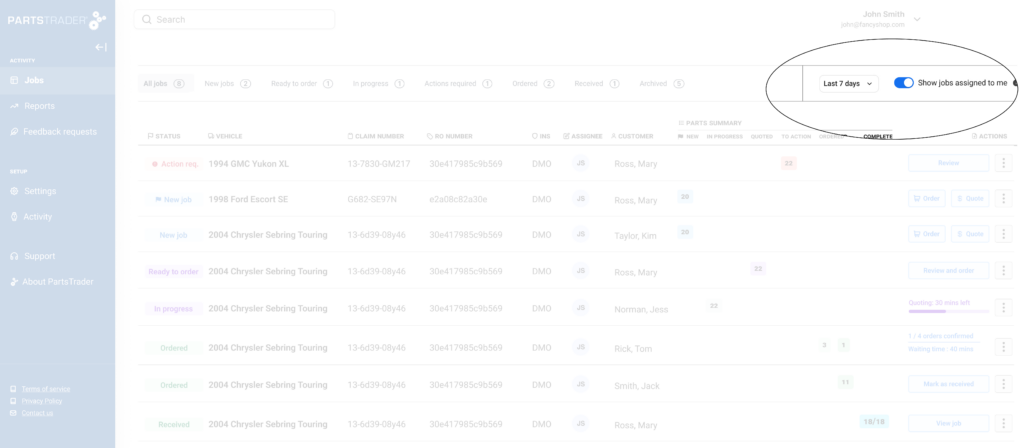
Assign to me
Easily assign jobs that you are working on to yourself, this allows you to toggle to see only jobs that are assigned to you. Helping ensure that you only see those jobs that you need to work on
Show only last 7 or 14 days Refine the jobs list even more to only see jobs that have been active in the last 7 or 14 days
Parts Page
INTRODUCING THE NEW PARTS PAGE
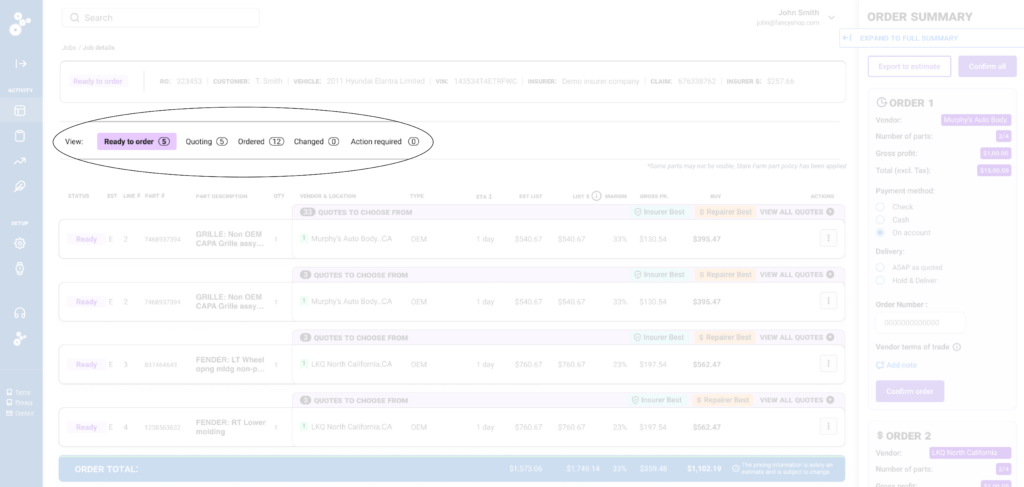
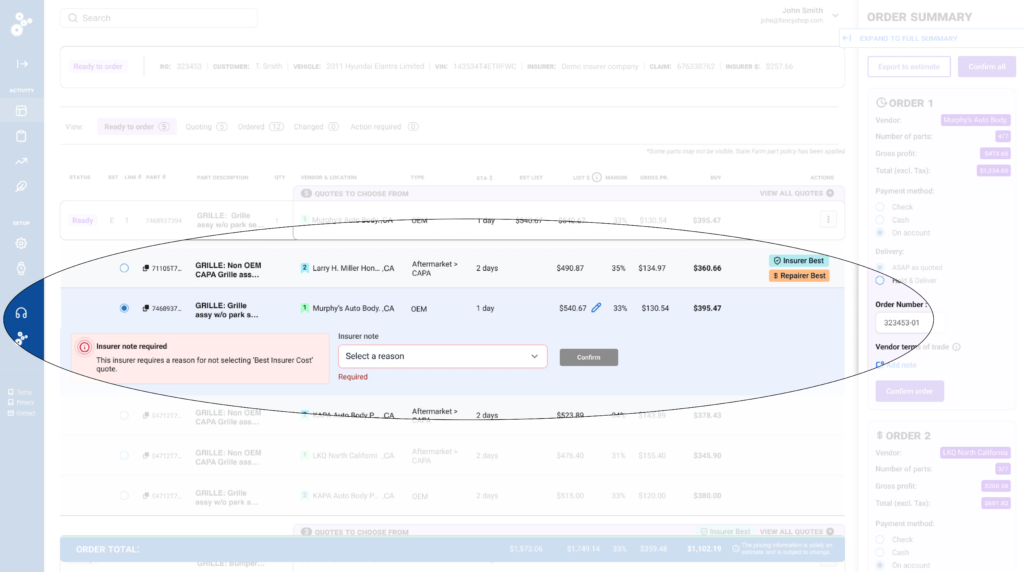
Our user-centric design means we’ve removed pain points & minimized user effort to tackle your biggest procurement problems. Our systemized assistance brings rules into the platform, meaning you only have to worry about which of the displayed parts to select. Beyond just efficiency, our platform enhances decision-making by providing real-time data and insights, empowering you with the tools you need to make informed, confident choices.
Click to enlarge image
Click to enlarge image
Instant Orders
ORDER INSTANTLY FROM YOUR PREFERRED VENDOR NETWORK
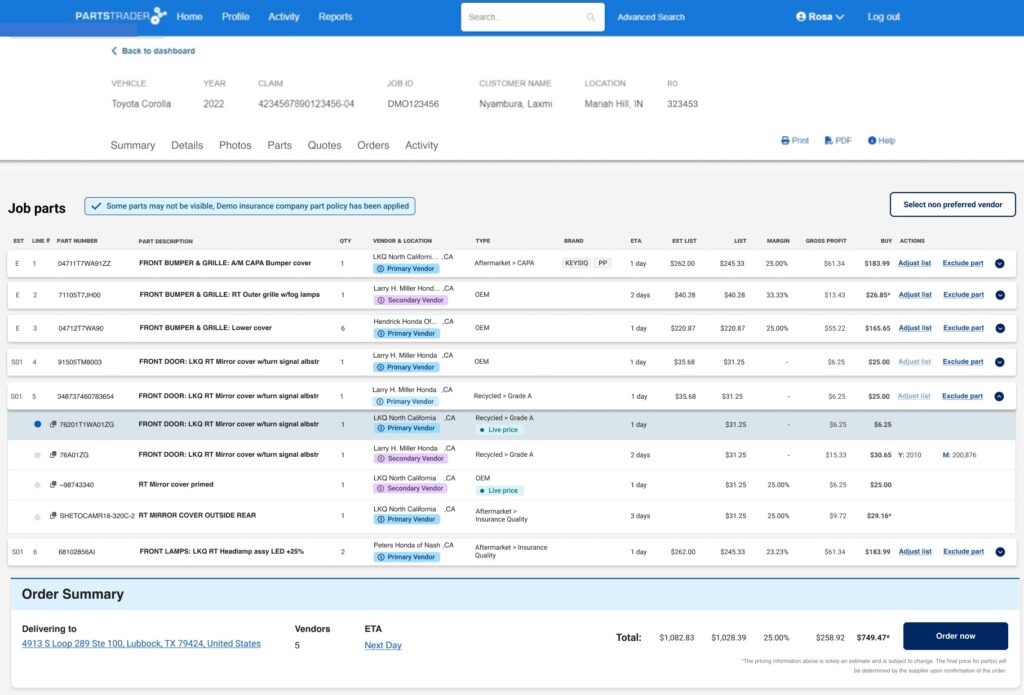
While our world-class competitive marketplace delivers better results on parts pricing, margin, and availability through our unique quoting process, we understand that not all repairs are created equal. Express or smaller repairs are different; focused on speed, optimizing cycle times, and using trusted vendors that deliver on time, every time. That’s why PartsTrader has developed a new Instant Order workflow; designed specifically to accelerate parts ordering for express and smaller repairs.
QUICK, SIMPLE PARTS ORDERING
-Speed and Convenience: The best discounts and buy prices are automatically calculated when ordering; negotiated and agreed by your procurement team.
-Trust and Reliability: Order directly from the vendors you trust the most. Your preferred vendor network makes deliveries reliable and your repairs predictable.
-Real-time Pricing and Availability: Compare dynamic and competitive options in real-time from your preferred network of Alternate suppliers.
-Simplified Workflow: Designed to rapidly compare and select the best part options from preferred OEM and Alternate vendors all on one screen.
Click to enlarge image
ONE SYSTEM TO MEET YOUR PARTS ORDERING NEEDS
We recognize smaller jobs can be incentivized differently, often with the goal of reducing cycle times, which helps drive better customer satisfaction. With Instant Ordering you now have the flexibility to prioritize speed. Parts are in the hands of technicians quicker and repaired cars to the customer faster. Our quoting system still delivers much better outcomes for larger repairs with the added benefit of making sure you stay aligned and compliant with any Carrier DRP requirements. PartsTrader provides you the best of both worlds, all in one system.
There is no quote process with an Instant Order- the order request is sent directly to the vendor for them to confirm. Depending on vendor type that may be automatic or manual.
PartsTrader calculates the buy price based on this discount.
Where your DRP relationship requires you to use PartsTrader you will need to use the quote process.
– If you would also like to be notified via text, please call Customer Care.
Returns
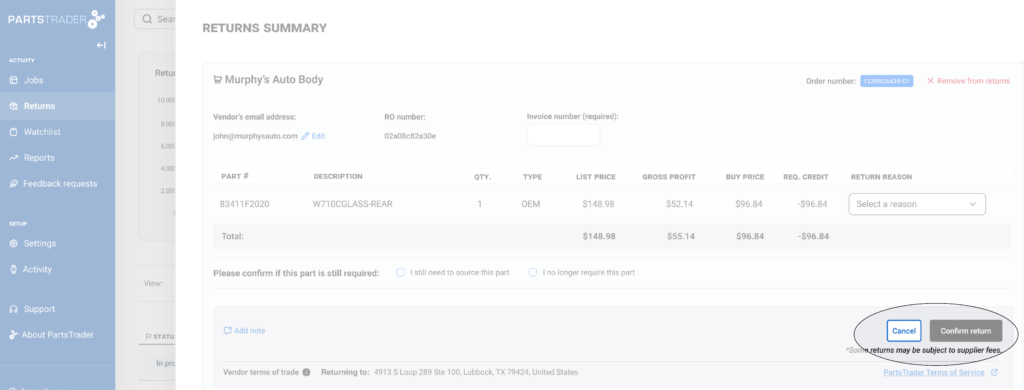
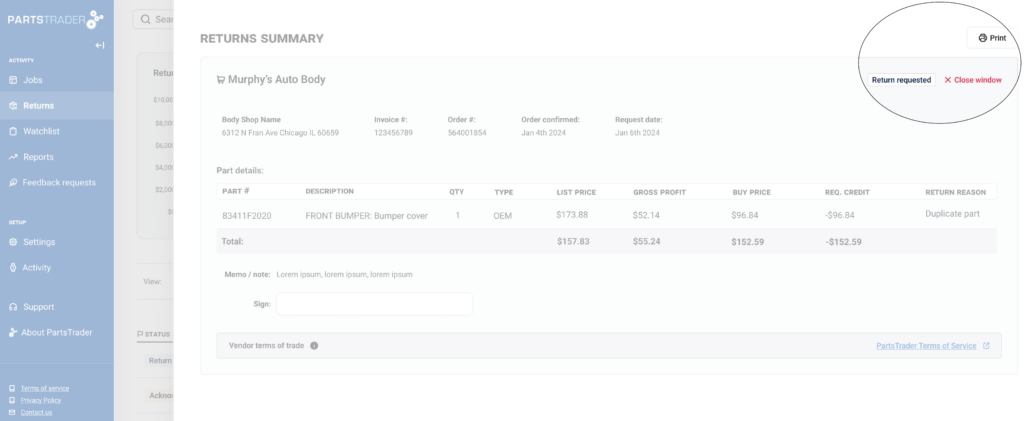
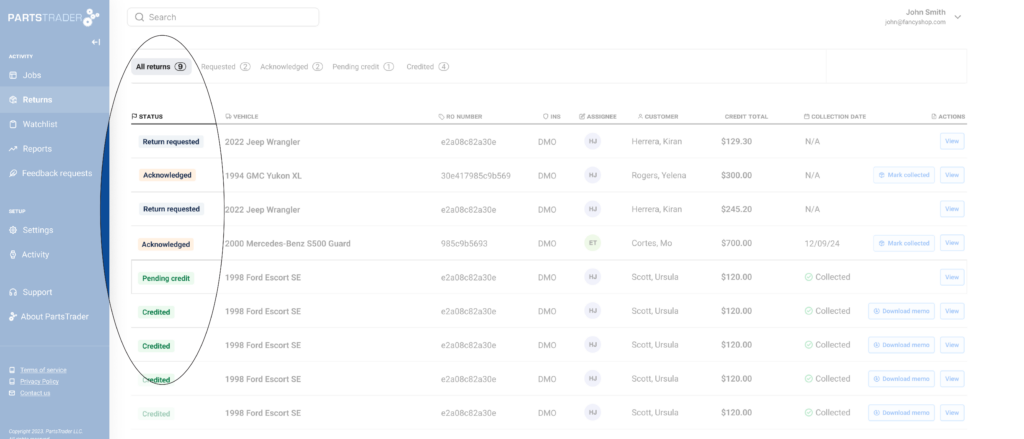
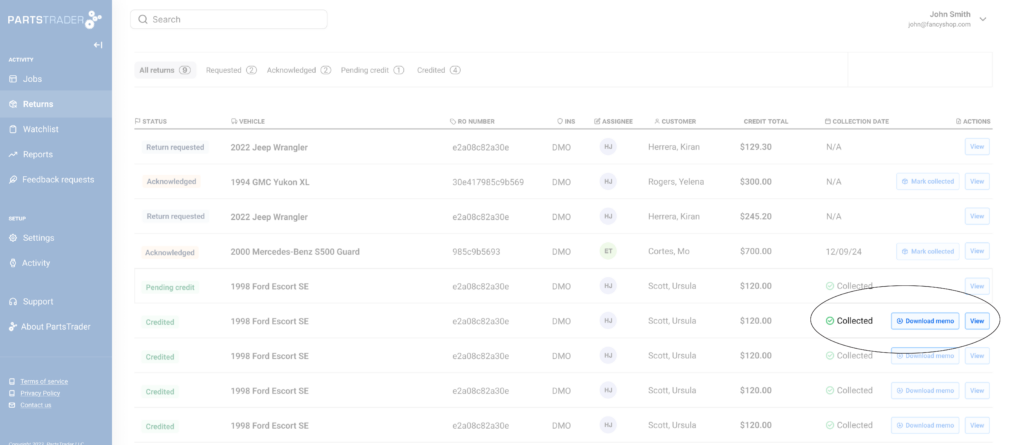
IMPROVE YOUR RETURNS WORKFLOW
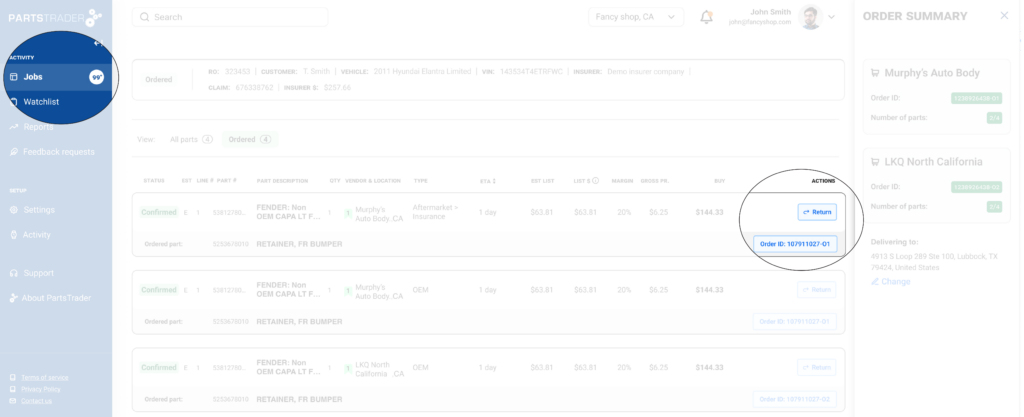
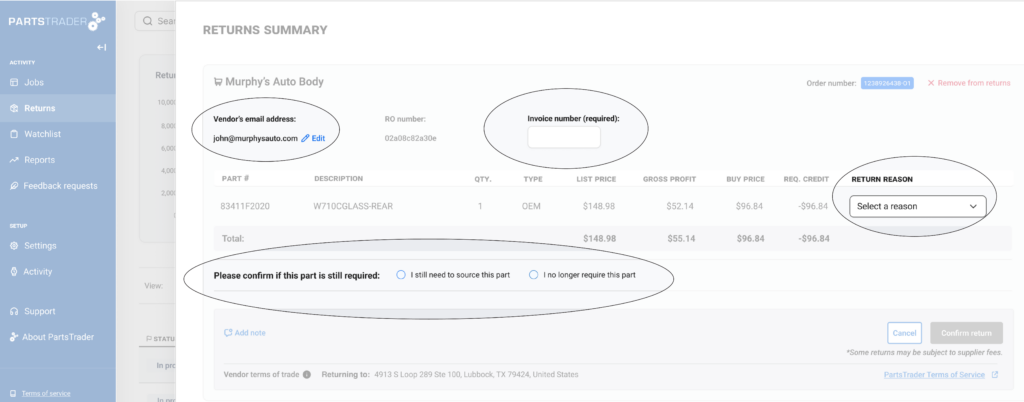
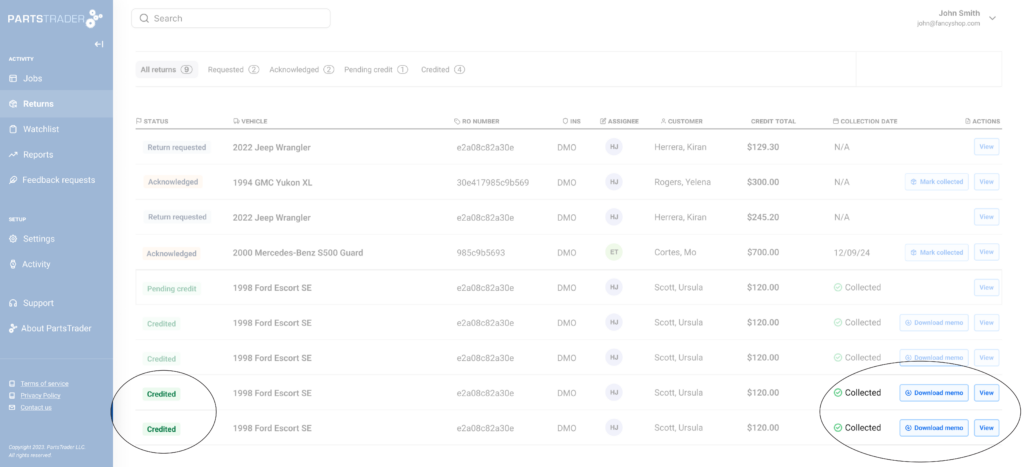
Say goodbye to the hassle of managing returns. With PartsTrader’s enhanced Returns feature, your shop gains a more efficient and organized workflow that keeps everything in one place and moving forward. No more back-and-forth phone calls or uncertainty—experience seamless returns management with full visibility at every step right on your dashboard.
HOW IT WORKS
Click to enlarge image
Click to enlarge image
Click to enlarge image
Click to enlarge image
Click to enlarge image
Click to enlarge image
Click to enlarge image
WANT TO KNOW MORE? GET IN TOUCH
Talk to one of our specialists for a demonstration (855) 932-7278
Organize training or have this enabled: [email protected]